
Python modules for data operations
A Python module is a data operation that runs as a job on the server: it takes a dataset and a few parameters and produces a new dataset. Fione comes with built-in modules for common table operations, k-means clustering and low-rank factorization, and administrators can upload their own.
A module never changes its input. Its result is saved as a new dataset in the same project, so you can inspect it, train on it or feed it to another module.
Where to find them
Open the account menu and choose Python modules. Administrators always see this entry; other users see it when the view is set to Detailed (the View switch in the same menu). The page lists every module with its id, name, kind, parameters, source (Built in or Uploaded) and, for uploaded ones, when it was uploaded.
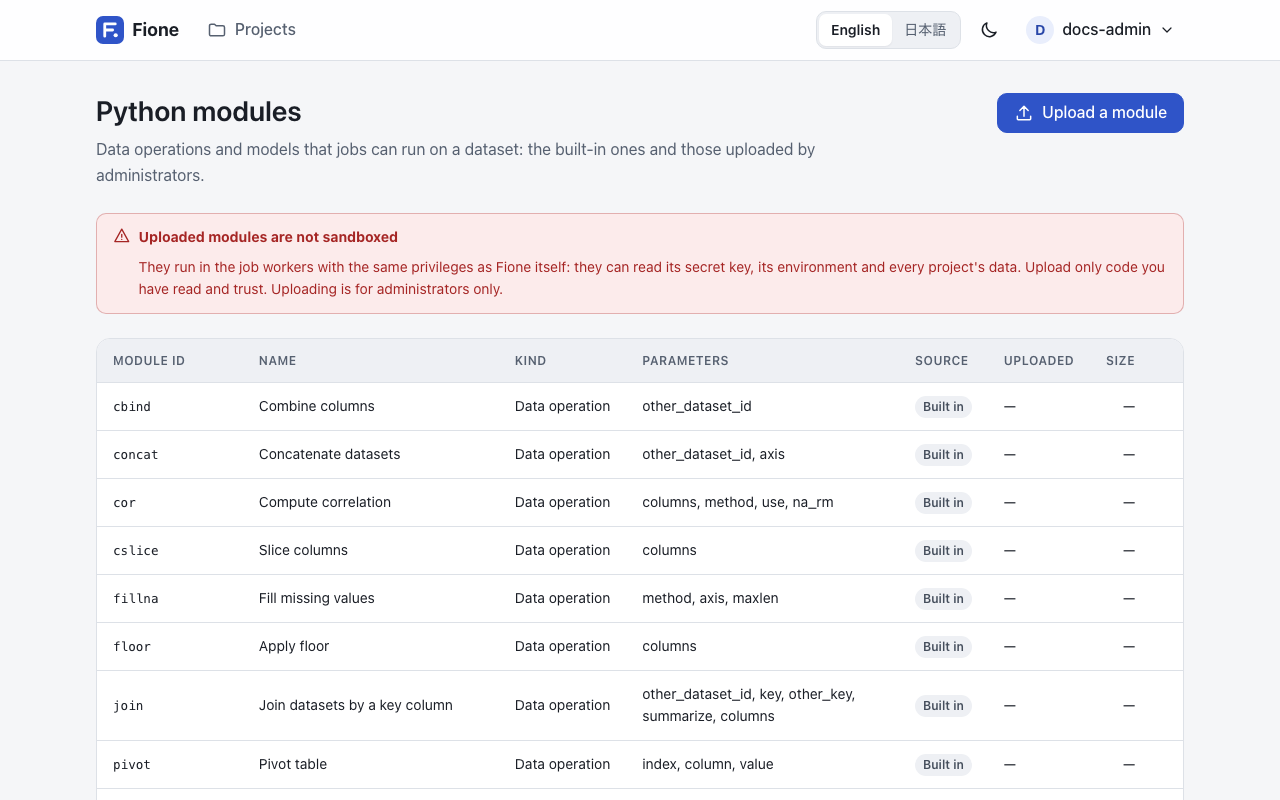
Everyone who can sign in can see the list. Running a module needs write access to the project, and uploading or deleting one needs the administrator role.
Modules run as jobs through the Python client or the REST API; the page itself is the catalogue. The assistant can also propose a join for you to confirm (see The assistant).
Kinds of modules
| Kind | Label on the page | What it does |
|---|---|---|
frame | Data operation | Turns a dataset into another dataset. |
train | Trains a model | Turns a dataset into a new dataset and saves a small trained state, which Fione calls a module model. |
predict | Predicts | Applies the state of a module model to a dataset. It takes the id of that state in module_model_id. |
The result of a predict module is saved as a dataset of type predict; the result of the others is saved as a train dataset. Unless you give a name, the new dataset is called <module id>_<input dataset name>.
Built-in modules
Data operations
| Id | Name | What it does |
|---|---|---|
cbind | Combine columns | Puts the columns of a second dataset (other_dataset_id) beside the columns of the first. Both need the same number of rows. |
rbind | Combine rows | Stacks the rows of a second dataset (other_dataset_id) under the first. Both need the same columns. |
concat | Concatenate datasets | Combines two datasets side by side (axis 1, the default) or one under the other (axis 0). |
join | Join datasets by a key column | Adds the columns of the other dataset to the rows with the same key. Every row of the first dataset stays. See below. |
cslice | Slice columns | Keeps the listed columns. |
rslice | Slice rows | Keeps the rows that match row_conditions. |
replace | Replace values | Sets column to value in the rows that match row_conditions (all rows if empty). |
sort | Sort | Sorts by column, ascending by default. |
fillna | Fill missing values | Fills gaps forward or backward (method), along axis, for at most maxlen cells in a row. |
floor | Apply floor | Returns the numeric columns rounded down. |
cor | Compute correlation | The correlation matrix of the numeric columns (method pearson or spearman). |
pivot | Pivot table | One row per value of index, one column per value of column, filled from value. |
split | Split into train, valid and test | Returns one part (train, valid or test) of a random split by train_ratio, valid_ratio, test_ratio (70, 15 and 15 by default) and seed. |
tokenize | Tokenize text | Splits a text column (target_column) into one token per row, with an empty row after each document. |
row_conditions is a text such as age >= 30 & country == JP: terms of the form column operator value (operators ==, !=, <, <=, >, >=, with a space on each side), joined by & (and) and | (or); & binds tighter. An empty text matches every row.
Joining. join matches key in the first dataset with other_key in the other one (the same name if other_key is empty). Each key may appear only once in the other dataset. If it appears more than once, set summarize to true: the other dataset is then reduced to one row per key, with the number of rows (rows) and, for each numeric column, its mean, minimum, maximum and sum, and for other columns the number of different values. With columns, only those columns of the other dataset are added or summarized.
Clustering and low-rank factorization
These come as pairs: a train module learns from a dataset, and a predict module applies what it learned to any dataset with the same columns.
| Id | Name | Main parameters |
|---|---|---|
kmeans_train | K-means (train) | columns (all columns if empty; each must be numeric), k (default 3), init, max_iterations, standardize (default true), seed, output_columns |
kmeans_predict | K-means (assign clusters) | module_model_id (a state from kmeans_train), output_columns |
lowrank_train | Low-rank projection (train) | columns, method (svd or nmf), n_components (default 2), seed, output_columns |
lowrank_predict | Low-rank projection (project) | module_model_id (a state from lowrank_train), output_columns |
K-means adds a cluster column; the low-rank modules add component_1, component_2 and so on. The result holds only those columns, plus the input columns named in output_columns. Missing values are replaced by the column mean seen in training. Every chosen column must be an integer or float column (not text, a date or a boolean), or the job fails and names the offending columns. Leave text columns out by listing the numeric ones in columns; the same goes for floor and cor.
Each module's full parameter list, with types, defaults and limits, is what GET /api/v1/modules returns.
Run a module
Running a module is a job. With the Python client:
from fione_sdk import Client

fione = Client()
job = fione.run_module(
    "<project-id>", "sort", dataset_id, {"column": "age"}, name="sorted by age"
)
job.wait()
sorted_frame = fione.read("<project-id>", job.result["dataset_id"])
With the REST API, POST /api/v1/projects/<project-id>/jobs/module takes the module, the dataset and its parameters:
curl -X POST http://localhost:8080/api/v1/projects/<project-id>/jobs/module \
  -H "Authorization: Bearer <your-token>" \
  -H "Content-Type: application/json" \
  -d '{"module_id": "sort", "dataset_id": 1, "params": {"column": "age"}}'
When the job is done, result.dataset_id is the new dataset. A train module also returns result.module_model_id, which you pass as module_model_id to the matching predict module:
train = fione.run_module(
    project_id, "kmeans_train", train_id, {"k": 3, "columns": ["sepal_length", "sepal_width"]}
).wait()
clusters = fione.run_module(
    project_id, "kmeans_predict", new_rows_id, {"module_model_id": train.result["module_model_id"]}
).wait()
Parameters are checked before the job is queued: an unknown parameter name, a missing required one or a value of the wrong type is refused right away. Jobs run in the short-job queue (FIONE_MAX_CONCURRENT_SHORT_JOBS at once) and read the whole dataset into memory.
Upload your own module (administrators)
A module is one Python file of up to 256 KB, in UTF-8. It defines two things: MODULE, a dict that describes it, and run(df, params, ctx), the function that does the work.
# sepal_area.py
MODULE = {
    "name": "Add sepal area",
    "kind": "frame",
    "params": {
        "properties": {
            "scale": {"type": "number", "default": 1.0},
        },
        "required": [],
    },
}


def run(df, params, ctx):
    return df.assign(sepal_area=df["sepal_length"] * df["sepal_width"] * params["scale"])
MODULE
MODULE needs all three keys.
| Key | Meaning |
|---|---|
name | The name shown on the page (a longer one is shortened to 100 characters). |
kind | "frame", "train" or "predict". |
params | The parameters, as {"properties": {...}, "required": [...]}. Each property has a type, and can have default, description, enum, minimum, maximum, maxLength, maxItems and items. |
A parameter type is string, integer, number, boolean or array (an array of strings). Nothing else is accepted, so a module cannot take nested objects. Fione validates the parameters of every job against this description and fills in defaults before run is called.
Two parameter names have a meaning, and must be integers:
other_dataset_id:ctx.otheris then that dataset, as a second frame.module_model_id:ctx.stateis then the state saved by atrainmodule. Apredictmodule must declare it.
run(df, params, ctx)
dfis the input dataset as a pandas DataFrame.paramsis the validated parameters, with defaults filled in.ctxhasother(the second dataset, orNone) andstate(the saved state, orNone).- A
frameorpredictmodule returns a DataFrame. Atrainmodule returns a pair(DataFrame, state), wherestateis a JSON object (a dict of text, numbers, booleans, lists and dicts) of at most 8 MB. There is no pickling: a state is plain JSON, so loading one cannot run code.
The returned DataFrame needs at least one column, with unique text column names, and at most 150 million cells (rows times columns). If run raises an exception, the job fails and its message names the exception; file paths are removed from the message.
A train and predict pair looks like this:
# column_mean_train.py
MODULE = {
    "name": "Column mean (train)",
    "kind": "train",
    "params": {
        "properties": {"column": {"type": "string"}},
        "required": ["column"],
    },
}


def run(df, params, ctx):
    column = params["column"]
return df, {"column": column, "mean": float(df[column].mean())}# column_mean_apply.py
MODULE = {
"name": "Center on the column mean",
"kind": "predict",
"params": {
"properties": {"module_model_id": {"type": "integer"}},
"required": ["module_model_id"],
},
}
def run(df, params, ctx):
column, mean = ctx.state["column"], ctx.state["mean"]
return df.assign(**{column + "_centered": df[column] - mean})Upload it
In the web app, open Python modules, choose Upload a module, enter a Module id, pick the Python file (.py), tick the confirmation that you understand the code runs unsandboxed, and choose Upload the module. The id has 1 to 40 characters: lower-case letters, digits and _, starting with a letter. It cannot be the id of a built-in module or of a module that already exists.
Through the API, upload the file as a multipart form with the fields id and file:
curl -X POST http://localhost:8080/api/v1/modules \
  -H "Authorization: Bearer <your-token>" \
  -F id=sepal_area \
  -F file=@sepal_area.py
Fione reads MODULE by importing the file once in a short-lived separate process (it must load within 10 seconds, so keep top-level code quick), then checks the description. A file with a syntax error, a missing MODULE or run, an unknown kind, or a predict module without an integer module_model_id is refused with a message.
To replace a module, delete it first and upload it again. Deleting a module (Delete next to it on the page, or DELETE /api/v1/modules/<module-id>) also deletes the states it trained; datasets and finished jobs keep their results. Built-in modules cannot be deleted.
Uploaded modules are not sandboxed
An uploaded module runs in the job worker with the same privileges as Fione itself. It can read the install's secret key, its environment and every project's data. Upload only code you have read and trust. This is why only administrators can upload modules, after confirming a warning. Built-in modules are not affected.
A job that is still waiting when you replace a module runs the new source, not the one that was current when the job was queued. See Known limitations for this and the other notes on modules.