
Sort incoming messages and catch spam
Messages come in all day, and someone has to decide where each one goes. This guide trains a Fione model that reads the text of a message and gives the probability that it is spam. It goes from the download of an open dataset to a curl call of the served model.
Starting Fione from the published images and the general serving steps are in the practical guides overview. This page shows what is particular to this use case: a column of free text, and messages that appear more than once.
The business question
In the data used here, about 13% of the text messages (SMS) are spam. A team that knows, as a message arrives, how likely it is to be spam can act on it:
- move likely spam out of the inbox, so that people read the messages meant for them first;
- send messages the model is unsure about to a person to check;
- see how much spam arrives from day to day, by counting the messages the model flags.
The model answers one question per message: is this message spam? It returns the answer and, more usefully, the probability of spam. Routing messages to more than two places (for example sales, support and billing inquiries) follows the same steps with a column that holds those destinations; this page tests only spam against ordinary messages.
Get the data
The data is the SMS Spam Collection from the UCI Machine Learning Repository:
- Page: https://archive.ics.uci.edu/dataset/228/sms+spam+collection
- Creators: Tiago Agostinho de Almeida, José María Gómez Hidalgo (2011; the names as in the
readme) - DOI: 10.24432/C5CC84
- Licence: Creative Commons Attribution 4.0 International (CC BY 4.0)
Attribution (UCI's citation): Almeida, T. & Hidalgo, J. (2011). SMS Spam Collection [Dataset]. UCI Machine Learning Repository. https://doi.org/10.24432/C5CC84. What we changed: we turned the file into a CSV with a header row, kept one copy of each repeated message, and set the last 500 messages aside to try predictions on (see Prepare the CSV); no message was changed.
The readme in the download has terms of its own besides the CC BY 4.0 licence on the UCI page: the two creators hold the copyright, the collection is provided as it is, without warranty and with a limitation of liability, and users agree to indemnify the copyright holders against claims arising from their use. The creators also ask, as a request ("We would appreciate if"), that you cite their paper and web page and send them a message when you use it.
In an empty directory, download and unpack it:
curl -LO https://archive.ics.uci.edu/static/public/228/sms+spam+collection.zip
unzip sms+spam+collection.zip
The zip holds two files: readme, and SMSSpamCollection (about 470 KB), the data. SMSSpamCollection is UTF-8 text with one message per line and no header row: the label (ham for an ordinary message, spam), a TAB, then the message as it was written. It has 5,574 lines. According to the readme, the messages are in English and were collected from sources on the web that are free, or free for research; most of the spam (425 messages) was taken by hand from a UK forum where people complain publicly about the spam they receive.
The data
| Column | What it holds |
|---|---|
label | The answer: ham (an ordinary message) or spam |
text | The message, as written (abbreviations, typing errors and all) |
Of the 5,574 messages, 747 (13.4%) are spam. Three typical rows, as they are in the CSV made below, an ordinary message, a spam message and an ordinary message that starts with a quotation mark:
label,text
ham,"Nah I don't think he goes to usf, he lives around here though"
spam,Ringtone Club: Get the UK singles chart on your mobile each week and choose any top quality ringtone! This message is free of charge.
ham,"""Are you comingdown later?"""
Two things in the file need attention before training.
First, quotation marks. 145 messages contain ", and 54 start with one. If you only add a header row and upload the file as it is, Fione reads a " at the start of a message as the start of a quoted value, as a CSV reader does: in our test it removed quotation marks from those messages, and one of them ran on into the next two lines, so Fione counted 5,572 rows instead of 5,574. Writing a proper CSV, as below, puts each message in quotes where needed and doubles the quotation marks inside it (the third row above), so every message arrives as it was.
Second, repeated messages. 403 lines repeat an earlier message word for word, so there are 5,171 different messages. Most of the repeats are ordinary messages (309; "Sorry, I'll call later" alone appears 30 times), and 94 are spam; no message appears with both labels. Real traffic does bring the same text again, so the copies are not mistakes. But while Fione checks its models, it sets rows aside in turn and tests the models on them; a copy among the rows a model learns from and its twin among the rows it is tested on lets the model "recognise" the answer, so the figures may look better than they are for messages it has not seen. We keep one copy of each message, so the figures measure that, and show the run with the copies in Read the results.
Prepare the CSV
This command reads SMSSpamCollection, keeps the first copy of each message in file order, and writes two CSV files with the header label,text: the last 500 messages to new-messages.csv, to predict later as messages the model never learned from, and the other 4,671 to train.csv. It needs only Python 3:
python3 - <<'PY'
import csv
rows, seen = [], set()
for line in open("SMSSpamCollection", encoding="utf-8"):
    label, text = line.rstrip("\n").split("\t", 1)
    if text not in seen:
        seen.add(text)
        rows.append([label, text])
for name, part in (("train.csv", rows[:-500]), ("new-messages.csv", rows[-500:])):
    with open(name, "w", encoding="utf-8", newline="") as f:
        csv.writer(f).writerows([["label", "text"]] + part)
print(len(rows), "different messages:", len(rows) - 500, "to train on, 500 set aside")
PY
It prints 5171 different messages: 4671 to train on, 500 set aside. Remove the copies before setting messages aside, so that no message set aside is also among those the model learns from. Of the 4,671 messages in train.csv, 594 (12.7%) are spam; of the 500 set aside, 59 are. Messages that differ only a little stay. Here, spam was often sent in several versions, with another number or another punctuation: when we ignore digits, capitals, spaces and punctuation, 15 of the 500 messages set aside, 14 of them spam, match a message in train.csv. So about a quarter of the spam set aside (14 of 59) is not entirely new to the model.
Train the model
- On Projects, create a project (we named it
inquiry-classification) and open it. - Press Upload training data, choose
train.csvand press Upload and analyze. Data analysis shows 4,671 rows, 2 columns and 0% empty cells. - Under What do you want to predict?, choose
label. Fione sees two values in it and suggests Classification. - Under Which columns should the model learn from?,
textis checked, and Fione shows its kind as Text: it reads the column as running text, not as a list of categories. Leave it checked. - Keep Classification under Prediction type.
- Under Maximum run time, choose 10 min (the default is 3 min; a longer run can find better models).
- Press Run.
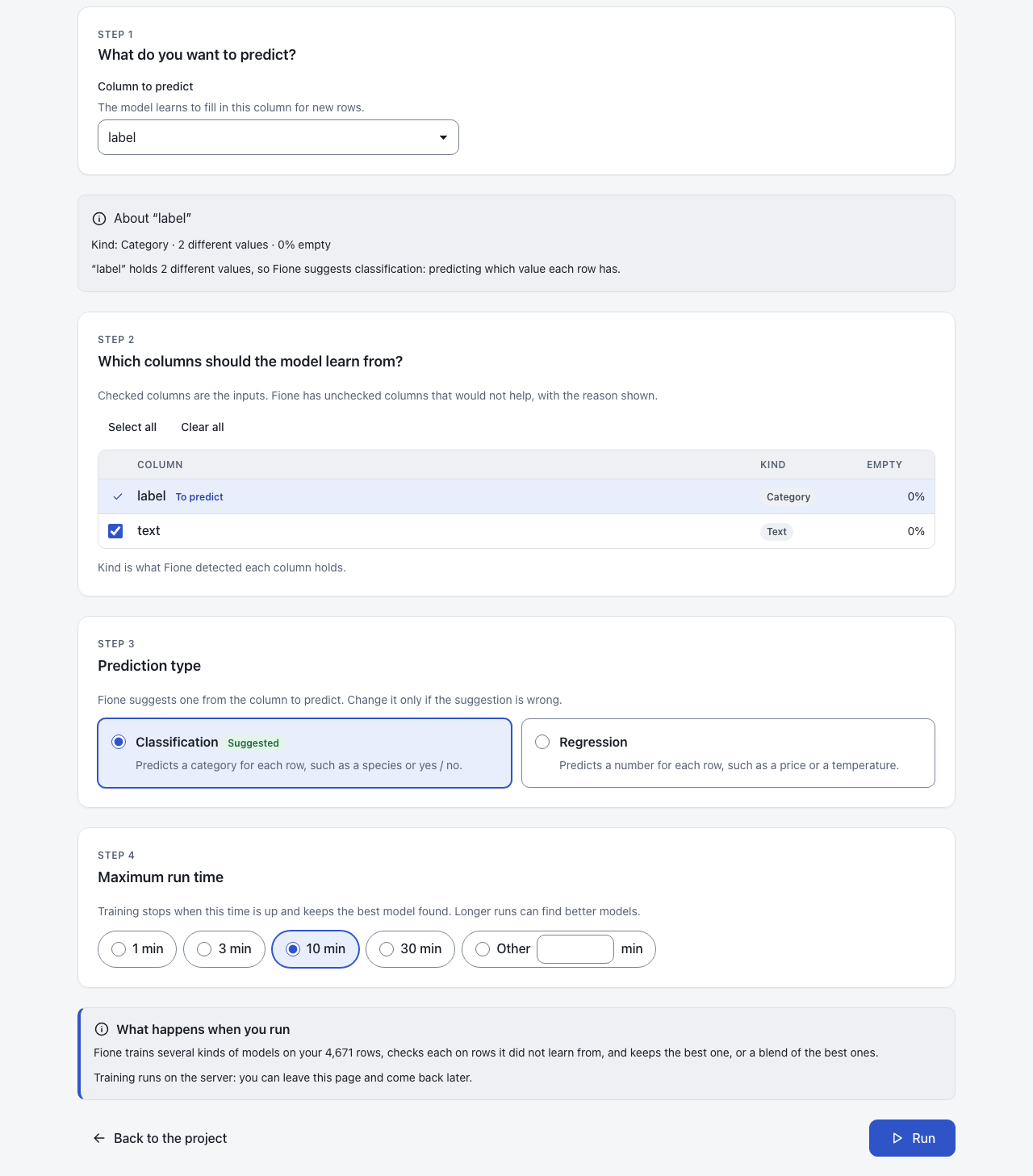
The first rows of the file, shown above this part of Data analysis, are left out of the picture: several spam messages there carry phone numbers.
When training ends, the page moves on to the Prediction summary.
Read the results
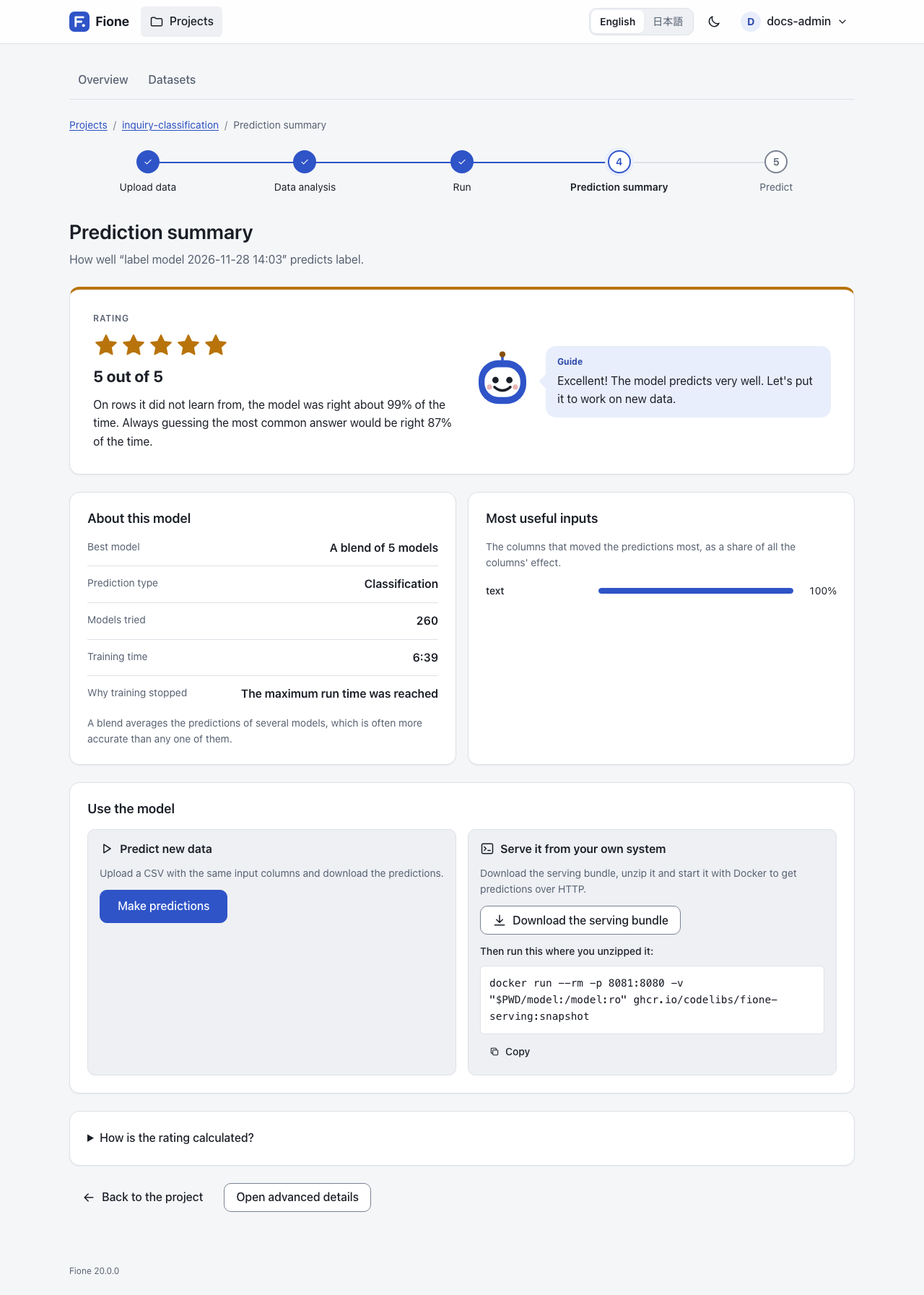
In our run:
- Rating: 5 out of 5. "On rows it did not learn from, the model was right about 99% of the time. Always guessing the most common answer would be right 87% of the time."
- Guide: "Excellent! The model predicts very well. Let's put it to work on new data."
- About this model: a blend of 5 models, 260 models tried, training time 6:39.
- Most useful inputs:
text100%. With one input column, this list has nothing to compare; the Importance tab shows the same.
Unrounded, the model's Accuracy (on the Metrics tab, below) is 0.991, and always guessing ham is right for 87.3% of the training rows, so the model covers (0.991 − 0.873) / (1 − 0.873) ≈ 0.93 of the distance from that guess to a perfect score: 0.8 or more gives 5 stars (How is the rating calculated? on the summary gives the formula and the bands).
Press Open advanced details and open the Metrics tab. It shows the figures measured on rows the models did not learn from. In our run:
- AUC 0.996 (0.5 is guessing, 1 is perfect): take one spam and one ordinary message, and the model gives the spam the higher probability 99.6% of the time.
- Confusion matrix: of the 594 spam messages, the model said
spamfor 560 (94%) and missed 34. Of the 4,077 ordinary messages, it called 7spam(fewer than 1%). Of the 567 messages it calledspam, 560 (99%) were spam (Precision 0.988).
For a mailbox, the two kinds of mistake cost differently: a missed spam is a nuisance, but an ordinary message moved out of the inbox may go unread. The ham/spam answer is the more likely of the two (the model's Choosing the predicted class setting is Most likely class). You can instead act on p_spam with a cut-off of your own: a high one moves only messages the model is very sure about, and a band in the middle can go to a person to check.
What Fione did with the text shows in the run's records. Among the training job's notices (Training job on the Overview tab of Open advanced details, then See details), one reads "derived features: text topics of text, text tokens of text, text shape of text". The Leaderboard tab lists the members of the blend with their weights: TextLinearPlain 0.37, TextLinearChar 0.30, CatBoost 0.17 and two LinearBoost models, 0.13 and 0.03. What the derived features and the TextLinear families are is described in Text columns.
To see what the repeated messages do, we trained a second model in the same way on the messages with their copies kept (5,070 rows: every row of the file except the 500 messages set aside and the 4 copies of them, so 399 of the 403 copies stay). It also got 5 out of 5: Accuracy 0.992 and AUC 0.997, against 0.991 and 0.996 without the copies. On the 500 messages set aside it missed 2 spam instead of 3 and moved no ordinary message. In our run, then, the copies changed the figures very little; we do not know whether they would on other data, where copies may be a larger share. The two sets of figures are not measured on the same rows, because the second set includes the copies.
Make predictions
Predict the 500 messages you set aside:
- On the Prediction summary, press Make predictions.
- Choose
new-messages.csvand press Upload. Fione says that "new-messages" (500 rows) has every column the model needs, and markslabelas Not used by the model. Keep it checked under Columns in the result: it is copied next to the predictions, so you can compare them with the real labels. - Press Predict. Predictions shows 500 rows × 5 columns and Download predict_new-messages.csv.
predict is the answer, and p_spam the probability of spam (p_ham is the rest). Of the 500 messages, the model called 56 spam, all of them spam, and missed 3 of the 59 spam messages; it moved no ordinary message (497 of 500 right). Five rows of our run, in the order of the file:
| Row | text | p_spam | predict | label (the real one) |
|---|---|---|---|---|
| 2 | By the way, 'rencontre' is to meet again. Mountains dont.... | 0.0008 | ham | ham |
| 11 | Great! How is the office today? | 0.0009 | ham | ham |
| 321 | dating:i have had two of these. Only started after i sent a text to talk sport radio last week. Any connection do you think or coincidence? | 0.10 | ham | spam |
| 394 | Latest News! Police station toilet stolen, cops have nothing to go on! | 0.011 | ham | spam |
| 495 | REMINDER FROM O2: To get 2.50 pounds free call credit and details of great offers pls reply 2 this text with your valid name, house no and postcode | 0.998 | spam | spam |
Rows 321 and 394 are two of the three spam messages the model missed. To us they read like ordinary messages: they carry no offer, price or reply instruction, as most spam does. The highest p_spam of an ordinary message was 0.32, so a cut-off of 0.1 would have caught two more spam (58 of 59 instead of 56) and moved 6 ordinary messages, and one of 0.2 caught 57 and moved 1. These are 500 messages, 59 of them spam; a few messages more or less change such counts noticeably.
Under the table, Why these predictions shows, for the first 5 rows, the columns that moved each prediction most. With one input, each row has one line, text, which accounts for the whole move from the average prediction (0.3% in our run) to the row's chance of spam. That average is not the share of spam in train.csv (12.7%).
Serve it as an API
Under Serve it from your own system, press Download the serving bundle. Unpack it into a directory of its own and run the command shown on the card there, as in the overview. Use the name of your file; for our model:
unzip fione-serving-label-model-2026-11-28-14-03-37.zip -d fione-serving-label-model-2026-11-28-14-03-37
cd fione-serving-label-model-2026-11-28-14-03-37
docker run --rm -p 8081:8080 -v "$PWD/model:/model:ro" ghcr.io/codelibs/fione-serving:snapshot
In another terminal, ask which columns the model expects:
curl -s localhost:8081/model{"names":["text","label"],"domains":[null,["ham","spam"]],"responseColumn":"label","category":"Binomial","nclasses":2,"nfeatures":1, ...}Send rows 11 and 495 of new-messages.csv, an ordinary message and a spam message:
curl -s -X POST localhost:8081/invocations -H 'Content-Type: application/json' -d '{"instances":[{"text":"Great! How is the office today?"},{"text":"REMINDER FROM O2: To get 2.50 pounds free call credit and details of great offers pls reply 2 this text with your valid name, house no and postcode"}]}'{"predictions":[{"label":"ham","index":0,"class_probabilities":[0.9990582659274491,0.0009417340725509729]},{"label":"spam","index":1,"class_probabilities":[0.0016180278998467264,0.9983819721001532]}]}class_probabilities follow the classes of label in domains, ham then spam, so the second number is the probability of spam: 0.0009 and 0.998, the same as p_spam for these rows under Make predictions. A mail or ticket system would send each incoming message and route it by that number.
Messages often contain quotation marks and apostrophes. Build the JSON with a JSON library (in Python, json.dumps) rather than by hand, so that they are escaped. In our run, small changes of form moved the probability only a little: the same spam message gave 0.998 as it is, 0.997 in lower case, 0.998 with doubled spaces and spaces around it, and 0.998 with a full stop added. A request without text gave the answer {"exception":"missing columns: ['text']"} for that row, with the HTTP status 200, so check each prediction for exception rather than relying on the status; an empty message ("") and null were answered as ham with a spam probability of 0.0012 and 0.0022, without a warning, so leave empty messages out before you send them.
From an AI tool
AI tools such as Claude and Codex can do the same through Fione's MCP endpoint: upload the CSV, train, read the results and predict. For a few messages, the predict tool takes rows like the two above and returns predict, p_ham and p_spam for each. Called directly over MCP for the model trained above, it returned the same probabilities as the API above (0.0009 and 0.998). How to connect a client and what to ask is in Run the AutoML loop from an AI tool with MCP, and the predict tool in Predicting new rows.